




Table of Contents
Introduction
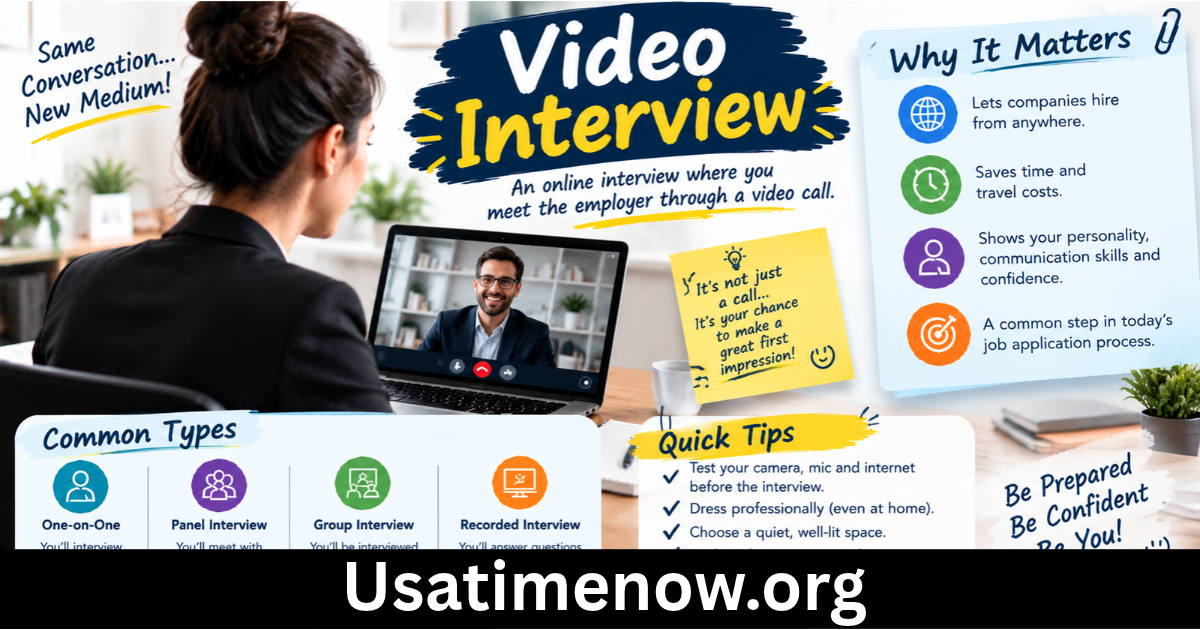
A video interview is a modern recruitment method that allows employers and job candidates to communicate through video conferencing technology. Instead of meeting in person, participants connect online using a computer, smartphone, or tablet. Video interview have become increasingly popular because they save time, reduce travel costs, and make the hiring process more flexible.
Whether you are a job seeker preparing for an upcoming interview or an employer looking to improve your recruitment strategy, understanding how video interviews work can help you achieve better results. This guide explains the meaning of a video interview, its types, benefits, challenges, and practical tips for success.
What Is a Video Interview?
A video interview is a job interview conducted remotely through a video communication platform. It allows recruiters and hiring managers to evaluate candidates’ qualifications, communication skills, experience, and suitability for a position without requiring a physical meeting.
Common video interview platforms include Zoom, Microsoft Teams, Google Meet, and specialized recruitment software.
Video interviews can take place in real time, with the interviewer and candidate communicating live, or through pre-recorded responses that employers review later. The format depends on the company’s recruitment process and the requirements of the role.
For example, a company hiring a customer service representative may conduct to assess communication skills, while a technology company may use video calls to discuss technical knowledge and previous projects.
Types of Video Interviews
Understanding the different types of video interviews helps employers and candidates prepare for the correct format.
1. Live Video Interviews
A live video interview takes place in real time. The interviewer and candidate join a scheduled online meeting and discuss the job, qualifications, and expectations.
This format closely resembles a traditional face-to-face interview because both participants can ask questions, respond immediately, and discuss topics in greater detail.
Live interviews are commonly used for initial screening, technical discussions, and final-stage hiring decisions.
2. Pre-Recorded Video Interviews
A pre-recorded allows candidates to record answers to a set of questions without speaking directly to an interviewer.
Candidates may receive a question, have a limited preparation period, and record their responses within a specified time limit. Recruiters can then review the recordings at a convenient time.
This format is useful when companies receive many applications or need to coordinate recruitment across different time zones.
3. Panel Video Interviews
A panel video interview involves a candidate speaking with two or more interviewers during the same online meeting. Panel members may include HR representatives, department managers, technical specialists, or senior leaders.
This approach allows several decision-makers to assess a candidate’s suitability without arranging separate in-person meetings.
4. Technical Video Interviews
Technical are designed to evaluate role-specific knowledge and practical skills. Depending on the position, candidates may be asked to solve coding problems, explain technical concepts, share their screens, or demonstrate relevant tasks.
These interviews are especially common in software development, engineering, IT, and other specialized professions.
Benefits of Video Interviews
Video interviews offer several advantages for employers and job seekers.
Saves Time and Reduces Costs
One of the main benefits of that they eliminate the need for travel. Candidates do not have to commute to an office, and employers can reduce expenses associated with arranging in-person meetings.
The time saved can make recruitment more efficient for both parties.
Expands Access to Candidates
Video interviews allow organizations to connect with applicants from different cities, regions, and countries. Employers can consider a broader talent pool without requiring candidates to travel long distances.
This flexibility can be particularly useful for remote positions and international recruitment.
Speeds Up the Hiring Process
Recruiters can schedule online interviews more easily than coordinating multiple physical meetings. Pre-recorded interviews also allow hiring teams to review candidate responses when their schedules permit.
As a result, companies may be able to move qualified candidates through the recruitment process more quickly.
Provides Greater Scheduling Flexibility
Candidates and employers can arrange interviews around existing work commitments and personal schedules. Recorded interviews may offer additional flexibility, depending on the employer’s deadlines and platform settings.
Supports Remote Hiring
For companies with distributed teams, make it easier to assess candidates without requiring them to visit a central office. They also help organizations maintain consistent recruitment processes across different locations.
Challenges of Video Interviews
Although video interviews offer many benefits, they can also create challenges that participants should prepare for.
Technical Problems
Weak internet connections, microphone issues, camera failures, or software problems can interrupt an interview. Testing the equipment and meeting link before the scheduled time can reduce these risks.
Limited Nonverbal Communication
Video calls may make it harder to interpret body language, eye contact, and other nonverbal signals. Camera positioning, screen layout, and connection delays can also affect communication.
Interviewers should focus on job-related evidence rather than relying too heavily on visual impressions.
Distractions and Background Noise
Household noise, unexpected interruptions, and untidy surroundings can affect concentration. Choosing a quiet location and using a simple background can help create a professional environment.
Candidate Anxiety
Some candidates feel uncomfortable speaking on camera or using unfamiliar technology. Providing clear instructions and allowing reasonable adjustments can help candidates demonstrate their abilities more effectively.
Privacy and Accessibility Concerns
Video interview platforms may collect personal information or recordings. Employers should explain how recordings are used, stored, and accessed, and should follow applicable privacy laws.
Organizations should also consider accessibility needs, including captioning, assistive technology, and alternative interview arrangements where appropriate.
How to Prepare for a Video Interview
Preparation can make a significant difference in a candidate’s performance.
Step 1: Test Your Technology
Check your internet connection, camera, microphone, speakers, and interview software before the meeting. Make sure you can access the meeting link and know how to join.
If possible, test your equipment with a friend or colleague.
Step 2: Choose a Professional Location
Find a quiet, well-lit space where you can speak without interruptions. Position yourself in front of a simple background and place the camera near eye level.
Natural light facing you often works better than a bright window behind you.
Step 3: Research the Company and Role
Review the job description, company website, and relevant information about the organization. Prepare examples that demonstrate your experience, achievements, problem-solving skills, and suitability for the position.
Step 4: Practice Common Interview Questions
Prepare clear answers to common questions, such as:
- Tell me about yourself.
- Why do you want to work for this company?
- What are your main strengths?
- Describe a challenge you solved at work.
- Why are you suitable for this position?
Practice speaking naturally rather than memorizing every sentence.
Step 5: Dress Professionally
Wear clothing appropriate for the position and company culture. Professional attire can help you feel confident and create a positive impression, even when the interview takes place remotely.
Step 6: Maintain Effective Communication
Speak clearly, listen carefully, and avoid interrupting. Look toward the camera when speaking to create a more direct connection, and use natural facial expressions and gestures.
Keep notes nearby if needed, but avoid reading entire answers from a screen.
Tips for Employers Conducting Video Interviews
Employers can improve the experience by creating a structured and fair process.
- Prepare relevant questions: Use questions that assess skills, experience, and job-related competencies.
- Share instructions in advance: Explain the platform, meeting link, expected duration, and interview format.
- Use consistent evaluation criteria: Assess candidates against the same core requirements to improve fairness.
- Minimize technical barriers: Allow candidates to test the platform and provide a contact method for technical difficulties.
- Respect candidate privacy: Obtain appropriate consent where required and explain recording policies.
- Provide timely communication: Inform candidates about next steps and expected decision timelines.
- Offer reasonable accommodations: Consider accessibility needs and alternative arrangements when necessary.
A structured approach helps recruiters make better-informed hiring decisions and provides a more professional candidate experience.
Video Interview vs. Face-to-Face Interview
Both interview formats can be effective, but they serve different practical needs.
| Feature | Video Interview | Face-to-Face Interview |
|---|---|---|
| Location | Remote | Physical meeting location |
| Travel requirements | Usually none | Often required |
| Scheduling | Often more flexible | Requires coordinating attendance |
| Technical requirements | Internet and suitable devices | No video platform required |
| Nonverbal communication | Limited by camera and screen | Easier to observe in person |
| Geographic reach | Broad | Often more location-dependent |
The best format depends on the job, company requirements, candidate accessibility, and stage of recruitment. Many organizations combine with in-person meetings when additional assessment is useful.
Frequently Asked Questions (FAQs)
1. What is a video interview in simple words?
A job interview conducted online using a camera and microphone, allowing employers and candidates to communicate without meeting in person.
2. What are the main types of video interviews?
The main types include live video interviews, pre-recorded interviews, panel, and technical video interviews.
3. Which platforms are commonly used?
Popular platforms include Zoom, Microsoft Teams, Google Meet, and specialized software used by recruitment teams.
4. How long does usually last?
A commonly lasts between 15 and 60 minutes, depending on the position, interview format, and number of questions.
5. What should I wear?
Choose clean, professional clothing suitable for the role and company culture. Solid colors often work well on camera, and your clothing should help you feel comfortable and confident.
6. How can I make a good impression during?
Test your equipment, join on time, research the company, speak clearly, maintain natural eye contact with the camera, and provide specific examples of your skills and achievements.
7. Can employers record?
Some platforms allow interviews to be recorded, but employers should follow applicable privacy laws and organizational policies. They should inform candidates about recording and obtain consent where required.
8. What should I do if my internet connection fails during an interview?
Try reconnecting to the meeting. If that does not work, contact the interviewer using the provided phone number or email address, explain the issue, and ask whether you can continue by phone or reschedule.
Conclusion
Video interviews have become an important part of modern recruitment because they help employers and candidates connect efficiently across different locations. They save travel time, expand access to talent, and offer greater flexibility throughout the hiring process. video interview However, successful require preparation, reliable technology, clear communication, and fair assessment practices. Candidates can improve their performance by researching the role, testing their equipment, and practicing their answers, while employers should provide clear instructions and evaluate applicants using consistent criteria.