






Table of Contents
An 8 hour shift calculator is a practical tool for employees, managers, and business owners who want to calculate working hours accurately and improve productivity time. 8 hour shift calculator Whether you work in an office, retail store, healthcare facility, factory, or remote environment, understanding your shift start time, end time, and breaks can make daily scheduling much easier.
Instead of calculating work hours manually, an 8 hour shift calculator helps determine when a shift ends, how much time an employee has worked, and whether unpaid breaks need to be deducted. It can also support attendance tracking, payroll preparation, and workforce planning. By using shift calculations correctly, businesses can reduce errors and employees can organize their time more effectively.
What Is an 8 Hour Shift Calculator?
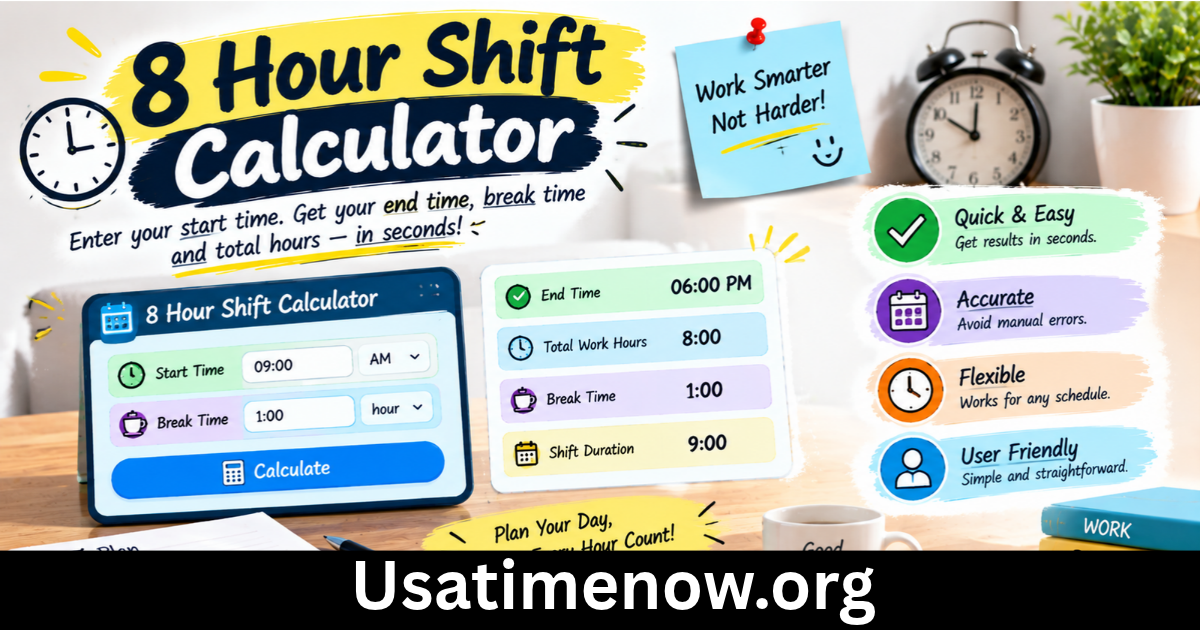
An 8 hour shift calculator is a tool that calculates the start or end time of a work shift based on the number of hours worked and any applicable breaks. It is commonly used to determine when an employee should finish work after completing eight working hours.
For example, if an employee starts work at 9:00 AM and needs to complete eight paid working hours, the finish time depends on the break policy. If a 30-minute unpaid lunch break is taken, the employee generally needs to remain at work until 5:30 PM to complete eight paid hours.
The calculator can also help users work backward from a finishing time to determine when they should start. Some tools offer additional features, including overtime calculations, total weekly hours, and timesheet summaries.
How Does an 8 Hour Shift Calculator Work?
Most shift calculators use three basic pieces of information: the start time, the required working duration, and the length of any unpaid breaks.
The general formula is:
End time = Start time + Working hours + Unpaid break time
For an eight-hour working shift, the following examples illustrate how breaks affect the finishing time.
| Start time | Unpaid break | End time |
|---|---|---|
| 8:00 AM | 0 minutes | 4:00 PM |
| 8:00 AM | 30 minutes | 4:30 PM |
| 8:00 AM | 60 minutes | 5:00 PM |
| 9:00 AM | 30 minutes | 5:30 PM |
| 10:00 AM | 45 minutes | 6:45 PM |
These examples assume that the employee must complete eight working hours and that the listed breaks are unpaid. Paid breaks, employer policies, and local labor laws may produce different results.
7 Easy Ways an 8 Hour Shift Calculator Improves Productivity Time
1. Saves Time on Manual Calculations
Calculating shift durations by hand can become confusing when schedules include lunch breaks, multiple pauses, or overnight working hours. Small mistakes can lead to incorrect attendance records or misunderstandings about finishing times.
An 8 hour shift calculator simplifies the process by handling the time arithmetic automatically. Employees can check when to finish work, while managers can prepare schedules without repeatedly performing manual calculations.
This saves administrative effort and allows people to focus on more important tasks.
2. Improves Attendance Tracking
Accurate attendance records are essential for businesses that monitor employee working hours. A shift calculator helps determine whether recorded start and end times correspond to the required working duration.
For example, a supervisor can compare an employee’s scheduled shift with the actual clock-in and clock-out times. After accounting for unpaid breaks, the supervisor can identify missing hours or potential overtime.
A calculator does not automatically verify attendance, but it can make reviewing timesheets easier and more consistent.
3. Supports Better Break Planning
Breaks are important for maintaining concentration, reducing fatigue, and supporting employee well-being. However, workers may become confused about how breaks affect the total shift length.
An 8 hour shift calculator makes the distinction between paid working time and unpaid break time easier to understand. If eight paid hours are required, an unpaid break generally extends the total time between clock-in and clock-out.
Clear break planning helps employees organize meals, appointments, and other daily responsibilities while ensuring that schedules meet workplace requirements.
4. Helps Calculate Overtime
Employees sometimes work beyond their scheduled shifts because of unexpected tasks, customer demand, or staffing shortages. An accurate record of working time can help managers determine whether additional hours have been worked.
For instance, if an employee completes nine paid hours on a day when eight hours were scheduled, the extra hour may need to be reviewed under the employer’s overtime policy and applicable law.
An 8 hour shift calculator can help establish the total hours worked, but it does not determine whether overtime pay is legally required in every situation. Overtime rules vary by location, employment agreement, and job classification.
5. Makes Weekly Scheduling Easier
Employees and managers often need to calculate working hours across several days. A shift calculator can provide a reliable starting point for creating daily schedules and checking weekly totals.
For example, someone working five eight-hour shifts completes 40 working hours before considering any additional hours. If unpaid breaks are included in the time spent at the workplace, the total time between arrival and departure will be higher.
Understanding these differences helps managers allocate staff more effectively and allows employees to plan their personal time.
6. Reduces Timesheet Errors
Incorrect timesheets can create problems with payroll, attendance records, and employee trust. Common errors include forgetting to deduct an unpaid lunch break, confusing AM and PM, or miscalculating shifts that continue past midnight.
A shift calculator reduces arithmetic mistakes when users enter the correct information. For better accuracy, businesses should also establish consistent procedures for recording breaks, approving corrections, and reviewing unusual shifts.
Digital time-tracking systems can provide additional safeguards by storing clock-in and clock-out records automatically.
7. Encourages More Effective Time Management
Knowing exactly when a shift begins and ends helps employees plan their day. They can schedule personal commitments, set realistic goals, and divide work into manageable periods.
Managers can also use shift calculations to balance workloads and avoid assigning more hours than a team can reasonably handle.
Productivity time is not simply about spending more hours at work. It also involves using scheduled hours efficiently, prioritizing important tasks, taking appropriate breaks, and maintaining a sustainable routine.
How to Calculate an 8 Hour Shift Manually
Although a calculator is convenient, understanding the basic calculation helps prevent confusion.
Step 1: Identify the start time. Record when the employee begins the shift.
Step 2: Add eight working hours. Calculate the time needed to complete the required paid working duration.
Step 3: Add unpaid breaks. Include any unpaid break periods that extend the time between starting and finishing work.
Step 4: Check the result. Confirm whether the shift crosses midnight and whether any paid breaks or special rules apply.
For example, an employee starts at 7:30 AM, works eight paid hours, and takes a 30-minute unpaid break. Adding eight hours gives 3:30 PM. Adding the unpaid break produces a finishing time of 4:00 PM.
For overnight shifts, the same principle applies, but the end time falls on the following calendar day.
Who Should Use an 8 Hour Shift Calculator?
An 8 hour shift calculator can benefit many types of workers and organizations.
- Office employees: Determine finishing times and plan daily responsibilities.
- Healthcare workers: Calculate scheduled shift durations and review break periods.
- Retail teams: Coordinate staff coverage across opening and closing hours.
- Manufacturing businesses: Organize production shifts and maintain consistent staffing.
- Remote employees: Track working hours and establish clearer boundaries between work and personal time.
- Human resources teams: Review timesheets and support workforce scheduling.
- Small business owners: Calculate employee hours and simplify routine administrative tasks.
The tool is particularly useful when employees have changing start times or when managers need to coordinate multiple schedules.
Tips for Choosing the Right Shift Calculator
Not every calculator provides the same functionality. Before choosing one, consider the features that match your requirements.
Check Break and Overtime Options
Look for a calculator that distinguishes paid breaks from unpaid breaks. If you regularly work additional hours, choose a tool that can also calculate overtime or total weekly hours.
Look for Overnight Shift Support
Employees working night shifts need a calculator that handles shifts crossing midnight. Without this feature, a simple time calculation can produce confusing results.
Consider Mobile and Desktop Access
A mobile-friendly tool allows employees to check schedules from different locations. Desktop access may be more convenient for managers who calculate several shifts or prepare timesheets.
Verify Results Against Workplace Policies
Even a reliable calculator depends on correct inputs. Check the result against the employer’s timekeeping rules, applicable labor requirements, and any relevant collective or individual employment agreement.
FAQs About an 8 Hour Shift Calculator
1. What time does an 8 hour shift end if I start at 9 AM?
If you need to work eight paid hours and have no unpaid breaks, the shift ends at 5:00 PM. With a 30-minute unpaid break, it generally ends at 5:30 PM.
2. Does an 8 hour shift include lunch?
It depends on the workplace’s policy and how the shift is defined. If lunch is unpaid, it usually does not count toward eight paid working hours. A paid lunch break may be treated differently.
3. How many hours do I work in five 8 hour shifts?
Five shifts of eight working hours equal 40 working hours. Unpaid breaks may increase the total time spent at the workplace.
4. How do I calculate an 8 hour overnight shift?
Add eight working hours to the start time, then include any unpaid breaks. If the result passes midnight, the finishing time falls on the next calendar day.
5. Can an 8 hour shift calculator calculate overtime?
Some calculators include overtime features. A basic calculator may only calculate total working hours, so overtime eligibility and payment should be checked against applicable rules and workplace policies.
6. Is an 8 hour shift the same as being at work for eight hours?
Not always. An eight-hour shift may refer to eight paid working hours, while unpaid breaks extend the total time between clock-in and clock-out.
7. Why is an 8 hour shift calculator useful for productivity time?
It helps employees and managers calculate working hours accurately, plan breaks, review attendance, and organize schedules. These benefits can reduce administrative errors and make daily time management easier.
Conclusion
An 8 hour shift calculator is a useful tool for employees, managers, and business owners who want to calculate work hours accurately and improve productivity time. By accounting for start times, end times, and unpaid breaks, it helps users understand when shifts finish and how much time has been worked.