





Table of Contents
Tracking working hours is essential for businesses, freelancers, and employees who want to manage their schedules effectively. A well-organized time sheet template makes it easier to record work hours, calculate time spent on tasks, monitor attendance, and prepare payroll information. It can also help individuals and teams understand how they use their productivity time and identify opportunities to improve daily workflows.
Whether you manage a small business, work remotely, or handle several client projects, using a consistent timesheet can make time management simpler and more accurate.
What Is a Time Sheet Template?
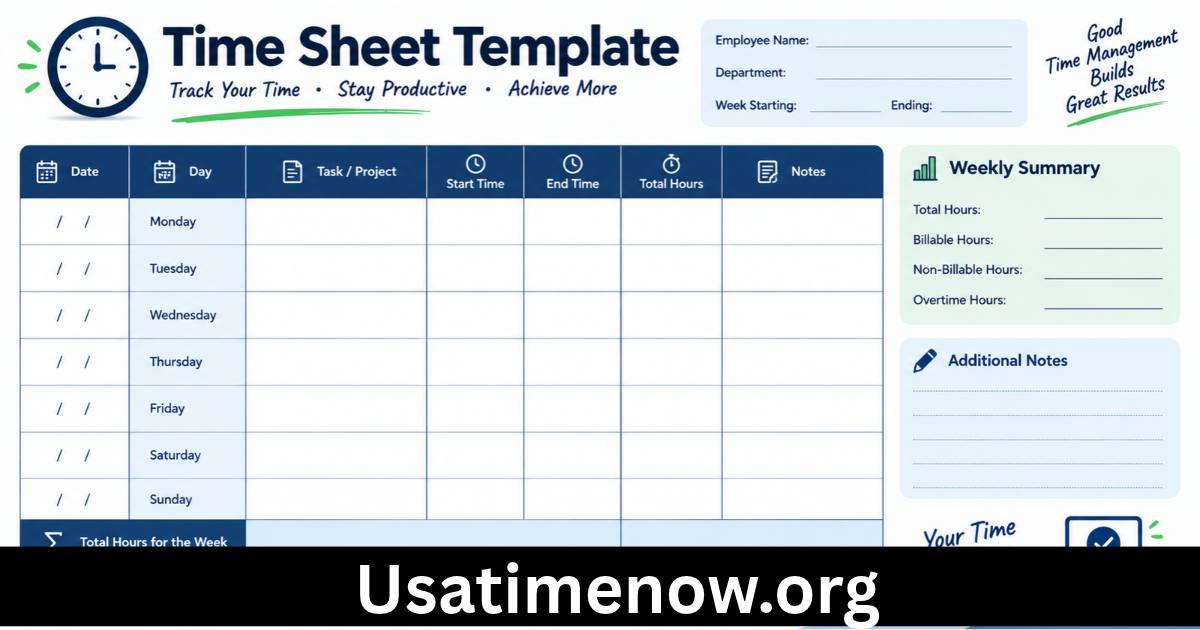
A time sheet template is a structured document or digital form used to record the hours an employee or freelancer spends working. It usually includes fields for the employee’s name, date, start time, end time, breaks, total hours, project details, and approval.
Timesheet templates are available in different formats, including spreadsheets, printable documents, and online time-tracking applications. The right format depends on how frequently you track time, how many people use the system, and whether you need payroll or project-cost information.
A simple template may be enough for an individual freelancer, while a larger business may need a system that supports multiple employees, approvals, reporting, and integrations.
Why Is a Time Sheet Template Important?
A timesheet provides a consistent record of working hours. Without a reliable process, employees and managers may have difficulty remembering how much time was spent on particular tasks.
Using a time sheet template can help organizations improve payroll preparation, understand project costs, monitor workloads, and plan resources more effectively.
It can also support better productivity time management by showing where working hours are being used and whether tasks are taking longer than expected.
7 Benefits of Using a Time Sheet Template
1. Accurate Recording of Working Hours
A timesheet helps employees record their working hours in a consistent format. Recording start times, end times, and breaks can reduce reliance on memory and make reviewing work schedules easier.
For organizations, accurate records can support payroll calculations and help resolve questions about attendance or reported hours.
The template should match applicable workplace policies and legal requirements, particularly when recording overtime or unpaid breaks.
2. Better Productivity Time Management
Understanding how time is spent can help employees make better decisions about their daily schedules.
For example, a freelancer might discover that a project takes longer than expected because of repeated revisions or administrative tasks. With this information, the freelancer can adjust future estimates and organize work more effectively.
Timesheets are most useful when the information is reviewed regularly and used to improve processes rather than simply collect data.
3. Simplified Payroll Preparation
Businesses often need accurate records of employee working hours to prepare payroll. A consistent time sheet template can help organize regular hours, overtime, and breaks in a clear format.
However, a timesheet alone does not guarantee accurate payroll. Employers must also apply the correct pay rates, overtime rules, leave policies, and applicable local regulations.
4. Improved Project Cost Tracking
For agencies, consultants, and freelancers, tracking time by project can reveal how much effort different assignments require.
Managers can compare estimated hours with actual hours to understand whether a project is staying within its planned budget.
This information can support better pricing, resource allocation, and future project planning.
5. Clearer Employee Workloads
Timesheets can help managers understand how work is distributed across a team. If one employee consistently records more hours than others, the information may indicate an uneven workload or unrealistic deadlines.
Managers can use these insights to redistribute tasks, review processes, or discuss workload concerns with employees.
Time records should be considered alongside work quality, task complexity, and results rather than treated as the only measure of performance.
6. Easier Reporting and Recordkeeping
A standardized template makes it easier to organize time records by employee, date, project, or department.
Digital spreadsheets can also support calculations and summaries, reducing manual work when the template is set up correctly.
Businesses should store records securely and retain them according to relevant policies and legal requirements.
7. Better Planning and Productivity
Historical time records can help people make more realistic schedules. If a task usually takes three hours rather than one, future plans can reflect that reality.
This helps employees avoid overloading their calendars and gives managers a clearer picture of available capacity.
Over time, reviewing timesheet data can support more realistic deadlines and better productivity time planning.
Essential Fields in a Time Sheet Template
A useful time sheet template should include the information needed for your particular workflow. Common fields include:
- Employee or contractor name
- Employee identification or department, if needed
- Date of work
- Start time
- End time
- Break duration
- Total hours worked
- Project or task name
- Regular hours and overtime, where applicable
- Notes or comments
- Employee and manager approval, if required
Avoid collecting unnecessary personal information. The template should be straightforward enough for people to complete accurately and consistently.
How to Calculate Working Hours Using a Timesheet
Calculating working hours usually involves subtracting the start time from the end time and then deducting unpaid breaks, where applicable.
For example, if an employee works from 9:00 a.m. to 5:00 p.m. and takes a 30-minute unpaid break, the calculation is:
- Total time between start and end: 8 hours
- Unpaid break: 30 minutes
- Total working time: 7 hours and 30 minutes
The treatment of paid breaks, overtime, and shifts that cross midnight depends on the applicable workplace policy and local rules.
For spreadsheet templates, formulas can automate these calculations. It is important to format time cells correctly and test the formulas before using the sheet for payroll.
How to Choose the Best Time Sheet Template
Choose a Format That Fits Your Needs
A printable timesheet may work well for simple manual recordkeeping. Spreadsheet templates are useful when you need automatic calculations, weekly summaries, or project-based tracking.
Online time-tracking software may be more appropriate for teams that need approvals, reporting dashboards, integrations, or access from different locations.
Check Ease of Use
A template should be simple to understand and complete. Complicated layouts can lead to missing entries and inconsistent information.
Choose clear column names, provide instructions when necessary, and avoid adding fields that do not serve a practical purpose.
Consider Privacy and Access
Timesheets can contain employee work patterns and other business information. Store them in an appropriate location and restrict access to authorized people.
If you use cloud-based software, review its security controls and data-handling practices.
Best Practices for Using a Time Sheet Template
For the best results, employees should record their hours regularly instead of trying to reconstruct an entire week from memory.
Managers should establish clear rules for submitting, reviewing, correcting, and approving timesheets. Any corrections should be documented according to the organization’s process.
Businesses should also review time records for patterns that may indicate workflow problems. The purpose is to improve scheduling, resource planning, and productivity time—not to encourage unnecessary monitoring.
FAQs About Time Sheet Templates
What is a time sheet template used for?
A time sheet template is used to record working hours, breaks, project time, and other relevant work details. Businesses may use it for payroll preparation, attendance records, project costing, and workload planning.
Can I create a time sheet template in Excel?
Yes. You can create a timesheet in Excel or another spreadsheet application using columns for dates, start times, end times, breaks, and total hours. Formulas can calculate working time automatically.
What is the difference between a timesheet and a time tracker?
A timesheet is a record of hours worked, while a time tracker is a tool or system used to measure and record time. Some time-tracking applications automatically generate timesheets.
How does a time sheet template improve productivity time?
It helps users understand how their hours are distributed across tasks and projects. Reviewing these records can reveal inefficiencies, support better estimates, and improve scheduling.
Should employees fill out timesheets daily or weekly?
Daily recording is often more accurate because employees can enter information while it is still fresh. Some organizations require weekly submissions, but employees may still record hours each day.
Can freelancers use a time sheet template?
Yes. Freelancers can track hours for client projects, estimate future workloads, prepare invoices when billing hourly, and identify which services require the most time.
What should be included in a weekly timesheet?
A weekly timesheet commonly includes the employee’s name, dates, start and end times, breaks, total daily hours, weekly totals, project details, and any required approval fields.
Conclusion
A reliable time sheet template can help employees, freelancers, and businesses record working hours, prepare payroll information, monitor project costs, and plan workloads more effectively. By making time records consistent and easy to review, a time sheet template can provide useful insights into productivity time and everyday work habits.